
Audit Next.js applications for performance, security, speed & crawlability and learn about the common mistakes when using the framework.

Over the last year or two, AI-assisted "vibe coding" has fundamentally changed how people approach new projects, including non-technical people.
Tools like Replit, Bolt and others aim to remove a lot of the traditional ‘hassle’ of things like deployment and hosting whilst giving a visual preview of an app so users can see what they’re building as they go along.
And these tools can be a great starting point for a fresh idea.
This article isn’t about vibe coding, it’s about helping those who have already vibe coded an app to review their work properly, and learn some fundamental stuff in the process.
Whether you agree with vibe coding or not; it’s here to stay, and I think as technical SEOs and developers we should help people learn more along their coding journey and build better products.
How to Use this Guide
-
You can skim through, thinking about your application, and stop at certain areas; there’s no specific order necessarily
-
I’ve tried to describe concepts in enough detail, but please do check external documentation where I’ve linked to it, as obviously each subject is huge
-
I’ve tried to give clear actions wherever possible - but there are areas where the section itself needs you to do a lot more digging
What is Vibe Coding?
I think it’s useful to define vibe coding in this context.
I would say vibe coding is creating an application without really understanding any of the code, letting the LLM of your choice do the work just by describing the features you want in plain language. Often this is also without really even looking at the code.
Vibe coding is not when a developer is using Cursor, Claude Code or similar to help them write code. So if you are an experienced Next.js dev, most the stuff here is hopefully stuff you already know. It may be a good read anyway as it’s from the perspective of someone who is primarily a technical SEO.
Why Next.js
The nature of Next.js allowing you to essentially build both front and back end technology using the same language (TypeScript) means that the vibe coding tools are highly likely to choose it.
Personally I like developing applications in Next.js for this very reason, but that also lends to some easy mistakes being made when the lines are blurred between front end, back end, and network, all within the same framework.
This article perfectly highlights how Next.js can be extremely powerful, whilst also emphasising a lot of the reasons some people don’t like it!
Why bother auditing?
The term "vibe coding" is just that - you're coding based on vibes - what feels right in the moment rather than following established patterns, architectural principles, or best practices.
AI tools are incredible at making something work right now, but they lack the context to make something work six months from now when your traffic has grown 10x and you need to add new features or get asked GDPR questions about the security of your DB and documentation.
The goal here is to help you understand how your application can be more maintainable and secure in the long run.
TL;DR: the Main Problems With Next.js
Let’s start by quickly covering a few core concepts and why they are important, a useful summary for those who just need the top level points.
Everything is a Client Component
Easily the worst offender.
AI tools tend to play it safe by wrapping entire component trees in 'use client' directives. Because client components let you do more stuff - they can pass data, access browser APIs, and handle interactivity. The AI knows this will ‘work’, so it defaults to the easy option.
The problem: Next.js 15+ entire architecture is built around Server Components being the default.
Server Components are faster, more secure, reduce JavaScript bundle sizes, and enable better SEO through proper page rendering. When everything is a client component, you lose these benefits entirely.
Data Fetching Inside Components
One of the most problematic patterns: AI tools frequently place database calls, API fetches, or external service calls directly inside page components or even nested child components.
The problem: This creates request waterfalls (each component waiting for its own data), causes unnecessary re-renders, makes the component impossible to prerender for SEO (and LLM crawlers!), and can result in client-side secrets being exposed.
Confused Routing
In Next.js 13, Vercel introduced the App Router, which fundamentally changed how routing works.
AI tools trained on older documentation can mix paradigms, creating routes that technically work but violate core architectural principles.
Basically, it’s a case of making sure your file structure is using the App Router and everything sits underneath that.
Inconsistent File Structure
Repeated utilities folders (/utils, /lib, /helpers) is really common, which accidentally creates duplicated logic and makes it hard to understand where new code should live.
No Separation of Concerns
Validation logic, database queries, business rules, and rendering logic all blend together in single files spanning hundreds of lines.
In a way, this is testament to how powerful Next.js is in that it can do this and run something.
But it makes testing hard, reusability tough, and our goal here is to break things down so that when you do want to add new features or upgrade, you’re not refactoring entire sections.
No Caching Strategy
Caching and prerendering are one of Next’s main strengths, yet often vibe coded apps will get this totally wrong.
Next.js 15+ is incredibly fast when you use its caching layers properly.
Environment Variable Chaos
This is much less of a problem now vs even just a year ago, but environment variables (in .env files) leaking into places they shouldn’t be seen is a serious issue. Secrets could potentially be shown and exploited, leading to compromised accounts, data exposure, or full access to critical backend systems.
Let’s jump in to the issues in more detail.
1. High-Level Architecture
Start at the top. Before editing a single file, you need to understand the current architecture (or lack thereof) and make high-level decisions about the target structure.
The architecture of your application is probably the most important thing to know inside-out if you want to truly be able to identify issues with your app.
Is the Project Using the App Router Exclusively?
Check: Does a /pages directory exist alongside /app?
If yes, you have a hybrid routing situation. While Next.js technically supports both simultaneously, this is almost never intentional in vibe-coded apps, it's usually because the AI mixed documentation sources.
I recommend that you should be fully using the App Router for a few reasons:
-
Consistency - one mental model for routing
-
Modern features like Server Components & Streaming
-
Better SEO through automatic metadata handling and other features
If both exist, create a migration plan. Start with static pages, then dynamic routes, then API routes (which become Route Handlers in App Router).
From an SEO point of view, mixed routing can cause duplicate content issues, confusing URL structures, and inconsistent metadata handling. Search engines may index both versions of the same page, diluting your SEO authority.
Directory Structure Sanity
Your ideal structure should look something like this:
project-root/
├── app/
│   ├── layout.tsx                 # Root layout
│   ├── page.tsx                   # Homepage
│   ├── (marketing)/               # Route group for marketing
│   │   ├── about/
│   │   ├── pricing/
│   │   └── contact/
│   ├── (app)/                     # Route group for authenticated app
│   │   ├── dashboard/
│   │   └── settings/
│   └── api/                       # Route handlers
├── components/
│   ├── ui/                        # Base UI components (buttons, inputs)
│   ├── marketing/                 # Marketing-specific components
│   └── dashboard/                 # App-specific components
├── lib/
│   ├── db/                        # Database layer
│   │   ├── index.ts
│   │   ├── queries.ts
│   │   └── mutations.ts
│   ├── auth/                      # Authentication logic
│   ├── utils/                     # Shared utilities
│   └── validations/               # Zod schemas
├── public/
│   ├── images/
│   └── fonts/
├── styles/
│   └── globals.css
└── types/
    └── index.ts
Identify Unclear Boundaries
In my opinion, this is the most important part of building a Next.js application. You need clear separation between different layers of your application, which in turn makes data fetching easier and scaling easier.
The main parts are:
-
UI Components (Pure Presentation)
-
Should receive props, render UI
-
No direct data fetching - this is important, as vibe coding systems get this wrong easily
-
Ideally Server Components unless interactivity required
-
Example:
<Card>,<UserAvatar>
-
-
Server Actions
-
Live in separate files marked with
"use server" -
Handle form submissions, data updates
-
Validate input, update database, revalidate cache
-
Example:
createPost()
-
-
Data Layer (Queries, ORM, Database)
-
Isolated in
/lib/db -
No mixing of business logic
-
Reusable query functions
-
Example:
getPostsByTag(),getAllProducts()
-
-
Business Logic / Domain Logic
-
Calculations, rules, transformations
-
Should be pure functions when possible
-
Example:
calculateShippingCost(),validateCouponCode()
-
-
API Routes / Route Handlers
-
Only when you need custom HTTP endpoints
-
For webhooks, third-party integrations, or custom APIs
-
Example:
/api/webhook/stripe,/api/webhook/mailchimp
-
2: Components: Client vs Server
This is the core Next.js 15/16 audit area and often where the biggest performance and SEO wins live.
Next.js is powerful as it allows you to blend server and client functionality by controlling component boundaries in a smart way. But this is also where it can easily go wrong.
I’m not going to go into the differences between client and server here as it’s too basic for the purpose of this article, but if you’re unfamiliar check out this video by Scott Hanselman.
Server First Thinking
AI tools default to 'use client' because it's safe - it means that the application needs less thought about boundaries and it pretty much ‘just works’. And to be fair client side interactivity was sort of the whole reason React (and therefore Next.js) became popular, but we’re way past the days of single page applications and we have React Server components at our disposal.
Any time 'use client' is included in a component, it is of course rendered on the client side.
The fundamental rule: A component should only be a Client Component if it absolutely needs to be.
It’s important to remember that if a component isn’t accessing network resources or APIs, it is essentially going to be made into a static server component by default. This is awesome functionality because it makes the whole experience fast for users. Basically you are making sure that the vibe coded application:
-
Renders layout stuff like headers and non-dynamic content statically so it’s mega fast
-
Renders dynamic content in suspense boundaries so that it doesn’t block loading
-
Renders stuff client side only when it really needs to be client side
Let’s go into a bit more detail.
Watch Out for ‘Use Client’ Directive
There is a directive from Next.js which has been mentioned a few times and needs its own section; that is ‘use client’.
Vibe coding tools absolutely love to add this, even to things that should be server components! This is by far the most common issue I see within Next.js, not just vibe coded apps but in general when I am doing SEO audits. To recap from Next’s documentation:
-
Server Components: use for static content, data fetching, and SEO-friendly elements.
-
Client Components: use for interactive elements that require state, effects, or browser APIs.
-
Component composition: nest client components within server components as needed, for a clear separation of server and client logic.
Action: Start by searching your codebase for ‘use client’ and take a look through each one. You are making sure the components that are client ones absolutely need to be.
Stuff that Makes a Component Need to be a Client One
Obviously you will need client side components for interactivity and other cool functionality, so it’s not like you should avoid them altogether. So what makes a client component need to be a client component? Weirdly I couldn’t find a good, clear list of this online, so I’ve created one here:
-
Does it use React hooks?
-
useState -
useEffect -
useContext -
useRef -
useReducer -
useImperativeHandle -
useLayoutEffect -
useTransition -
useDeferredValue -
useId(only when used for client-side behaviour)
-
-
Does it attach event listeners?
-
Form events:
onSubmit,onChange,onInput,onInvalid -
Mouse events:
onClick,onDoubleClick,onContextMenu,onMouseEnter,onMouseLeave,onMouseMove -
Keyboard events:
onKeyDown,onKeyUp,onKeyPress -
Pointer/touch events:
onPointerDown,onPointerUp,onPointerMove,onTouchStart,onTouchEnd -
Focus events:
onFocus,onBlur -
Drag/drop events:
onDrag,onDragStart,onDragEnd,onDrop -
Scroll & wheel:
onScroll,onWheel
-
-
Does it access browser APIs or runtime-only features?
-
window -
document -
localStorage,sessionStorage -
location/history -
matchMedia -
IntersectionObserver -
ResizeObserver -
MutationObserver -
setTimeout,setIntervalonly when tied to browser lifecycle -
Cookies when accessed via
document.cookie -
Canvas / WebGL
-
If you are creating new functionality, think about as much as possible keeping Server Components as ‘wrappers’, and adding small Client Components for interactive parts. In modern Next.js applications, this should always be the way to go.
Prevent Accidental React Server Component Waterfalls
Basically a waterfall is when data fetching happens sequentially instead of in parallel, causing slow page loads. Imagine one thing loading after another, and the user has to wait for each one.
Vibe coding tools for some reason love to include data fetching in a way that creates this effect, but it’s important to make sure that the Next.js 16 features are taken advantage of, as if they are properly used they can mean your application runs really fast.
Version 16 gives improved partial re-rendering, meaning React can now update parts of the page without re-rendering the entire tree, making updates faster. But you have to be clever with it.
Imagine you had a dashboard component like this:
// app/dashboard/page.tsx

export default async function Dashboard() {
  return (
    <div>
      <UserProfile /> // Fetches user data
      <RecentOrders /> // Waits for UserProfile, then fetches orders
      <Analytics /> // Waits for RecentOrders, then fetches analytics
    </div>
  )
}

// Each component fetches its own data i.e.
async function UserProfile() {
  const user = await db.user.findFirst()
  return <div>{user.name}</div>
}
The problem is these fetch sequentially, meaning that the time they take will add up and cause a slower user experience.
Use Suspense Boundaries
Use Suspense boundaries around components to prevent component waterfall slowness. I actually see these not being used often, and I think it’s because they are relatively new. The previous example becomes:
// app/dashboard/page.tsx

import { Suspense } from 'react'

export default function Dashboard() {
  return (
    <div>
      <Suspense fallback={<LoadingAnimation />}>
        <UserProfile />
      </Suspense>

      <Suspense fallback={<LoadingAnimation />}>
        <RecentOrders />
      </Suspense>

      <Suspense fallback={<LoadingAnimation />}>
        <Analytics />
      </Suspense>
    </div>
  )
}
This means components show to the user as they are loaded, and the user also has a better experience, meaning no asyncronous loading is slowing things down.
Action: look at your core pages and note which components you are using to display data to the user. Apply Suspense boundaries wherever appropriate.
Learn About Suspense Boundaries & Prerendered Content
If you’re really getting into Next.js, this is a fantastic feature and it’s worth looking at the latest Next.js 16 documentation around Cache Components. Not part of the audit, just something worth knowing.
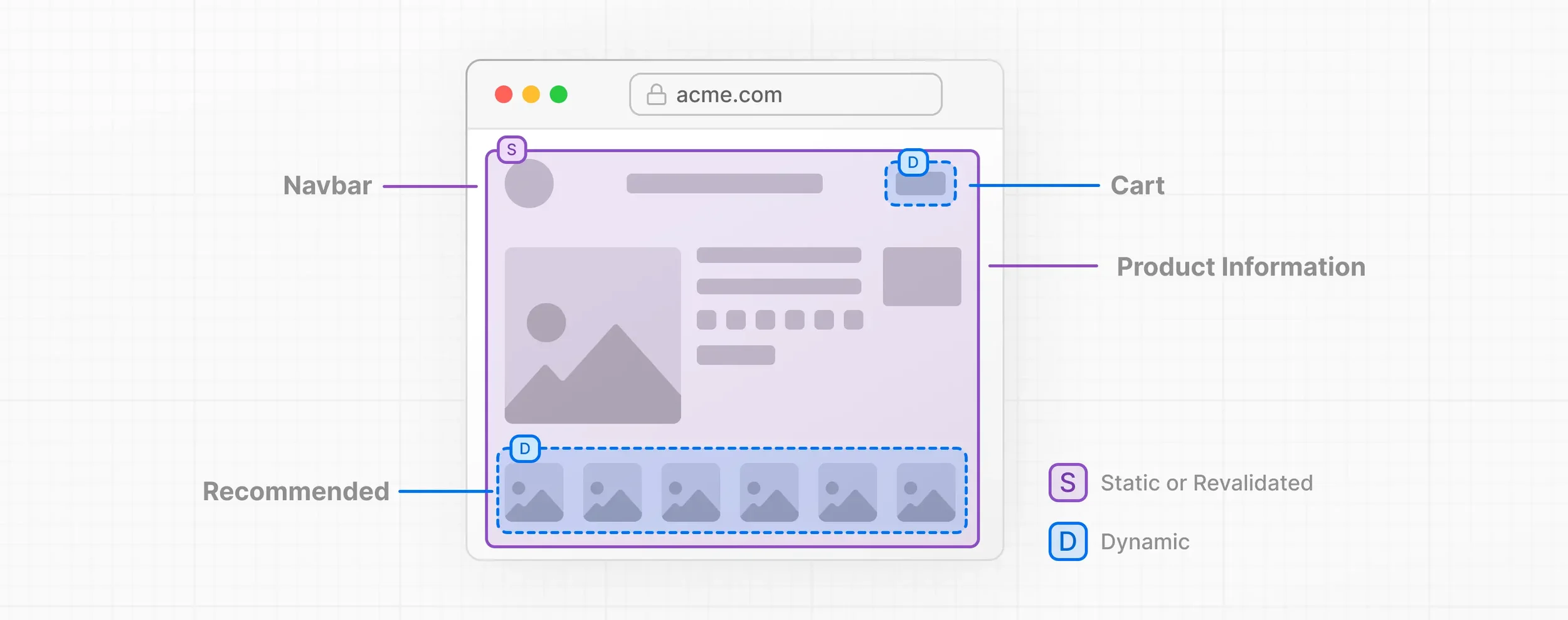
Illustration from Next.js documentation.
3: Data Layer
This is almost certainly the most difficult part of the audit, as you’re effectively investigating something that always feels like it needs a security expert. But the principles are quite clear so don’t worry.
AI tools have gotten a lot better in this area now, but it’s definitely worth taking a look to get your house in order when it comes to data fetching and processing.
There are 4 important parts:
-
Database abstraction layer
-
Server actions
-
Client side secrets
-
Input validation
Validate Database Abstraction Layers
Vibe coded apps get really messy here a lot of the time, especially if you aren’t giving the tool context. What can happen is either multiple database layers are created, or worse with Next.js the database doesn’t even have its own layer and pulls everything through logic within components. Again, the framework is powerful enough to let you get away with this, but you should try to do better.
The key point is that your database should be accessed through a consistent abstraction layer, not called directly from pages and components. This means a more maintainable and secure app.
The ideal structure should look something like:
lib/
└── db/
    ├── client.ts          # Database client initialization
    ├── queries.ts         # Read operations
    ├── mutations.ts       # Write operations
    └── schema.prisma      # (if using something like Prisma)
Of course, follow recommendations from certain DB providers - for example Supabse doesn’t look quite the same as this but is close.
The main thing to note is to keep database logic in a dedicated lib/db layer and import those query functions into your React Server Components, instead of writing queries directly inside components.
This also means error handling should be more efficient, for both the user and the developer.
Action: look for the following patters outside of your db folder. This means searching your /app folder for:
-
Inline SQL queries i.e. things containing
SELECTorFROM -
Things that mention your database or ORM, so if you are using Prisma for example just search for ‘prisma’ and check you’re not calling stuff like
prisma.user.find -
Fetch queries - sometimes this is okay, but generally anything with ‘await fetch’ will want to be abstracted into database queries
You’ll need to refactor these into functions within the abstracted database mentioned above.
Make Sure Server Actions Are Used Correctly
Server Actions are commonly misused in AI-generated code. They're powerful but have specific rules and when used properly they naturally progressively enhance pages with functionality.
Server Actions are functions that run exclusively on the server, are callable from client components, and used typically for creating, updating & deleting data. The most useful of which is a form that posts data such as an email form.
Actions: check for the most common mistakes:
-
Adding server actions in random places
- Create a /app/lib/actions.ts file in that location and add your actions there. This makes it easier to maintain and use them across multiple areas of your application. Search for ‘use server’ and see how many instances there are outside of this folder.
-
Defining actions in client components
- You must make sure that the ‘use server’ directive is added at the top of each function and that they definitely aren’t wrapped in a
use clientdirective. This should throw an error but you can’t be too careful. Remember, everything that is ‘underneath’ (a child of) a client component becomes a client component itself, defeating the object of server actions.
- You must make sure that the ‘use server’ directive is added at the top of each function and that they definitely aren’t wrapped in a
Check for Accidental SSR Client-Side Secrets
One of the most dangerous issues in vibe-coded apps is exposing server-side secrets to the client. This is extremely easy for hackers to find and manipulate.
Again, tools have got a LOT better with this stuff, but it’s still one of the most important checks.
It’s not necessarily directly SEO-related, but security breaches from exposed secrets can result in site downtime, data theft and potentially Google penalties - devastating for SEO. Sounds scary: it is.
Action: Search your codebase for environment variables and make sure secret ones are never reachable from the client. In terminal run:
# Search for environment variable usage
grep -r "process.env" app/

# Search specifically for NEXT_PUBLIC_* variables
grep -r "NEXT_PUBLIC" app/
Any variables that aren’t “NEXT_PUBLIC” that show up in component files (or files imported by client components) are a red flag. It usually means a server-only secret is at risk of being bundled to the client. ”NEXT_PUBLIC” variables are intentionally public, so seeing them in client code is expected. The important thing is to make sure you’ve only put genuinely public values in there (e.g. Supabase anon key, public API base URLs), never private secrets like DB passwords or service keys.
Generally, the database you are working with will provide Next.js specific documentation and you should read through that to check you’re getting it right.
When your database layer is abstracted properly, only your server-side DB/config modules should read sensitive process.env values. Components and UI code should import functions like getPosts() or createUser() from your DB layer, not call process.env or the database client directly.
If you find something that is clearly in the wrong place:
-
Even if you don’t think it has been compromised, treat as if it has been if it’s a real secret
-
Rotate the key immediately in your provider, update .env, and redeploy
-
Move the variable to server-only code
-
Fix the root problem by ensuring secrets only ever live in a dedicated server-only layer
Input Validation is Easily Missed
Personally, I find this to be one of the most boring areas of web development 😆 But like most tedious things, I’ve learnt it’s very important!
AI-generated apps typically trust all user input. This is a critical security and stability issue when it comes to server actions (above). Every Server Action must validate inputs before using them.
This section could essentially be a tutorial on how to use Zod, which I’m obviously not going to do. What I would say is Zod is a simple and clean way to add validation, and it’s a good idea to use it, so I’ve added an example below.
There is a caveat here - if your app is using something like Supabase or a CMS like Sanity or Payload, you may have built in validation already, so check their documentation. Supabase has rate limits and things like that built in for example.
Action: check your server actions manually and see if they are too simple by using the below as a reference. Take the time to add validation wherever it is needed. If you install Zod and are careful, you can get AI to help you do this!
Without validation (typical AI output):
"use server"

export async function createUser(formData: FormData) {
  const email = formData.get('email') as string
  const password = formData.get('password') as string

  // No validation! What if email is invalid? Password too short?
  await db.user.create({
    data: { email, password }
  })
}
Here’s an example of what this looks like with validation using Zod:
// lib/validations/user.ts

import { z } from 'zod'

export const createUserSchema = z.object({
  email: z.string().email('Invalid email address'),
  password: z.string().min(8, 'Password must be at least 8 characters'),
  name: z.string().min(2, 'Name must be at least 2 characters')
})

export type CreateUserInput = z.infer<typeof createUserSchema>

// app/actions/users.ts
"use server"

import { createUserSchema } from '@/lib/validations/user'
import { db } from '@/lib/db'

export async function createUser(formData: FormData) {
  // Parse and validate
  const parsed = createUserSchema.safeParse({
    email: formData.get('email'),
    password: formData.get('password'),
    name: formData.get('name')
  })

  // Handle validation errors
  if (!parsed.success) {
    return {
      error: parsed.error.flatten().fieldErrors
    }
  }

  // Type-safe data
  const { email, password, name } = parsed.data

  // Check for existing user
  const existing = await db.user.findUnique({ where: { email } })
  if (existing) {
    return { error: { email: ['Email already registered'] } }
  }

  // Create user
  await db.user.create({
    data: { email, password, name }
  })

  return { success: true }
}
4: Caching & Revalidation
This is a huge subject in itself, so I will try to focus on Next.js specific implementations rather than dive too far into caching in general. I’m going to do a separate article on Next caching, look out for it.
When it comes to Caching in Next.js we are really concerned with what is being cached on the server rather than the browser’s HTTP cache.
If you’re interested in caching in general, I’d recommend Jono Alderson’s massive article on caching.
The biggest problem with vibe coded apps in this respect is they aim to get something working whilst ignoring caching, revalidation and potential performance benefits that come with Next.js. And revalidation tags can become a right mess.
Identify Unnecessary noStore() Usage
Both noStore() and 'force-dynamic' tell Next.js to skip all caching and regenerate the page on every request. AI assistants often use this when they're unsure about caching requirements.
Obviously this can be useful sometimes (like when you absolutely do need data to refresh each request), but mostly you want Next to be caching as much as possible so extra compute isn’t used and things are fast.
Happy to be proven wrong, but I think most pages absolutely do not need to use these directives. Use them only for truly dynamic, personalised, or real-time content. Otherwise aim for static generation or revalidation.
Action:
-
Search for noStore() and force-dynamic
-
Ask of each instance: does this page really need to be dynamic?
-
If the content rarely changes, keep it static
-
If the content occasionally changes, use revalidate (more elsewhere)
-
If the content is highly personalised or real-time, keep it dynamic
-
Use Proper Caching Patterns
Directly related to the previous point, it seems useful to touch on the various types of caching and when you would want to use them.
Caching methods from fastest to slowest are literally:
-
Static Generation (built at build time)
-
Cache Components (brand new, only touched on here)
-
Incremental Static Regeneration (ISR - static with revalidation)
-
Route Cache (server-side rendered, cached)
-
Data Cache (fetch responses cached)
-
Dynamic (no caching)
Let’s have a look at some simple code to demonstrate the abilities of Next caching.
Although the examples here use fetch() for simplicity, the same caching mindset applies to database calls too. fetch() integrates with Next.js caching automatically, but database queries do not. If you want DB results cached, you need to wrap them in cache().
With new Cache Components ('use cache') you can take this a step further by caching not just the data, but the rendered Server Component itself, so the UI can be reused without recomputing or re-rendering, as long as the data is cacheable and doesn’t depend on per-request values. The goal is the same throughout: only make things dynamic when absolutely necessary.
For static data:
const data = await fetch('https://api.example.com/data', {
  cache: 'force-cache' // Cache indefinitely (default)
})
For data that changes occasionally:
const data = await fetch('https://api.example.com/data', {
  next: { revalidate: 3600 } // Revalidate every hour
})
For data that changes frequently:
const data = await fetch('https://api.example.com/data', {
  cache: 'no-store' // Never cache (force dynamic)
})
Action: this is a matter of running through each data call and deciding what you need.
Check Your Build Summary
Even with proper configuration, builds can fail or pages can incorrectly become dynamic, especially when vibe coded. Every time you build, Next will give you a summary of routes and the type of rendering they have. It should look something like this:
Route (app)                              Size     First Load JS
┌ ○ /                                    5 kB           85 kB
├ ○ /about                               3 kB           83 kB
├ ƒ /blog/[slug]                         8 kB           88 kB
└ ● /dashboard                           12 kB          92 kB

○  (Static)  prerendered as static content
●  (SSG)     prerendered as static HTML (uses getStaticProps)
ƒ  (Dynamic) server-rendered on demand
Have a look through the routes and see if anything stands out as being dynamic when it shouldn’t. You can investigate from there.
From a performance and SEO point of view, the goal is usually to make sure as much of your site is static as possible.
Use Next.js Image Tags
AI code often uses raw <img> tags, missing the awesome optimisation of Next.js <Image> tags.
Use next/image for automatic optimisation, define width/height to avoid CLS, configure remote images, and always provide meaningful alt text.
Action:
-
Find
<img>and replace with<Image> -
Ensure every image has:
-
width + height
-
descriptive alt text
-
Side note: I always got freaked out by width + height directives. But remember they aren’t about forcing fixed-size images. They tell the browser the aspect ratio, so it can reserve the right space before the image loads. This prevents layout shift (CLS), improves Core Web Vitals, and keeps the page visually stable - while still being fully responsive.
5. SEO Metadata
Next.js makes it incredibly easy to create application routes, and incredibly easy to forget to include critical SEO metadata, which still has a big impact on performance in Google.
Include Dynamic SEO Metadata
Check each of your main routes for the generateMetadata() function by searching the files. If it’s not there, the Next.js documentation on the topic gives some simple examples.
Make sure you have:
-
titlewhich appears in search results (50-60 characters optimal) -
descriptionwhich appears below the title in search results (150-160 characters optimal) -
Open Graph - optional but definitely improves social sharing, just make sure to set your images to the appropriate placeholder
-
Canonical URLs - prevent duplicate content issues
6. Accessibility & Semantic HTML
Accessibility and good HTML practices go hand in hand, and are important now because accessibility is a legal requirement. It’s also just good for maintainability and SEO.
This is a massive subject worthy of its own audit, so I’m just going to cover a couple of basics that I see are consistently wrong with vibe coded apps.
Include Proper Heading Hierarchy
AI tools often choose heading levels based on visual appearance rather than semantic structure. This is pretty basic stuff, but honestly I see this constantly, even from talented developers. You want to check each important page to make sure the there’s only one H1, and the headers below make sense. Here’s an example of a crappy heading hierarchy:
// app/about/page.tsx

export default function AboutPage() {
  return (
    <main>
      <h1>About Us</h1>
      <h3>Who We Are</h3> {/* << Skips H2 entirely */}
      <p>We are a digital agency building great products.</p>

      <h2>Our Services</h2> {/* << goes backwards in hierarchy */}
      <p>We help businesses grow online.</p>

      <h1>Get in Touch</h1>  {/* << multiple H1s on page - happens a lot */}
      <p>Contact us if you want to work together.</p>
    </main>
  );
}
I’m sure I don’t need to explain how to fix this - use headers where they follow on logically.
-
One
H1per page (the main title) -
Don't skip levels
-
Headings create outline and structure (imagine a table of contents)
Label Your Buttons and Links
Constantly see this issue! Buttons and links that don’t say what they do.
Screen readers rely on meaningful labels, and users navigating by keyboard or assistive tech often browse a list of buttons/links only, so every one needs to make sense on its own.
What to check:
-
Buttons should say what they do wherever relevant
-
Links should describe the destination
-
If you removed the visuals, would the action still make sense?
A simple rule: if it wouldn’t make sense when read aloud.. it’s not accessible.
Here’s a quick example covering the lot:
// app/account/page.tsx

export default function AccountPage() {
  return (
    <main>
      <h1>Your Account</h1>

      <section>
        <h2>Profile actions</h2>

        {/* Clear, descriptive labels */}
        <Link href="/account/password">
            <button>Change password</button>
         </Link>


        {/* Still meaningful even out of context */}
        <button>Delete account</button>
      </section>

      <section>
        <h2>Navigation</h2>

        {/* Links that describe destination */}
        <a href="/settings">Go to account settings</a>
        <a href="/billing">View billing details</a>
      </section>
    </main>
  );
}
What Else?
Although I briefly covered caching, I think it’s worth its own article aimed more directly at SEOs and just to give a little more context. Check out the guide to caching in Next.js.
Summary
-
Watch out for
'use client'- the worst offender - and aim to statically render as much of your site as possible for speed, crawlability, and stability. -
Next.js aggressively caches by default, but only explicit revalidation keeps content accurate and up to date.
-
Dynamic rendering is valid for user-specific content, but should always be intentional.
-
Clear separation between UI, data, and actions makes your project more maintainable and reduces common vibe-coding mistakes.
-
Caching decisions affect SEO beyond speed, including indexing consistency and metadata freshness.
I hope you learnt a lot about Next.js issues here. It is a powerful framework but often gets put down by SEOs because of some of these issues, which are usually misunderstood or simply just misused. Vibe-coded applications aren't inherently ‘bad’, particularly as AI tools improve, and we have a duty to educate those using them.
However, they are often used as rapid prototypes that prove concepts and validate ideas quickly. When that validation is met and you want to take your application to the next level, audit it before growing; you’ll thank yourself later.
If you need a hand auditing or refactoring your Next.js application, I’d love to help.