
Let’s face it, caching is boring.
Of all the cool things we make as web developers or interesting problems we fix as technical SEOs, the least exciting is probably caching.
On top of that I’ve been battling with the Next.js caching documentation which usually sends me to sleep or confuses the hell out of me, and with the introduction of Next.js 16 we also saw Cache Components, another feature in their arsenal to get confused by.
The documentation tends to focus on the technical “how it works” rather than the “why you should care”, so I wanted to write this piece to break down the core concepts of caching in Next.js from the perspective of a technical SEO: someone who spends a lot of time thinking about how information gets discovered by crawlers.
If You Remember One Thing
I find the documentation makes this sound more confusing than it needs to be, but it’s the core principle of how Next approaches caching.
Next.js will statically render and cache route output wherever it can.
If something in the route forces the app to present the user with request-time data, Next switches to dynamic rendering. Otherwise, it’ll make routes static by default.
Basically, Next wants to make it as easy as possible for you to serve as much content as possible from a cache.
This is a good thing.
If you get it right, you end up with many parts of your site as blazing fast static HTML that is cached on a CDN (if you host with Vercel or similar).
And for SEOs, we want to make sure our client’s Next.js applications have generated static pages as much as possible, because these will be discovered properly by search engine & LLM crawlers and have excellent performance for users.
Building in Islands of Interactivity
Next.js is fundamentally trying to solve the problem: how do we make sites blazing fast by default, but still keep data fresh?
This is about thinking in terms of two things: pages that can be static, and pages that have to be dynamic.
Next.js gives developers the ability to cache at multiple layers:
-
Page level - A single page can be cached or refreshed independently
-
Data level - individual data requests can be cached, reused, or refreshed
-
Route (section) level - an entire section of the site, everything inside a folder, can share caching behaviour
-
Request level - specific actions or submissions can bypass or trigger cache updates
If you understand where caching happens and who controls it, things start to make a bit more sense. But having 4 different caching options, each with their own features, makes it pretty difficult to get this stuff right.
The Dream: Rendering as Many Static Pages as Possible
In my opinion the most confusing thing about caching is how it relates to rendering (and vice versa).
It’s useful to think of the two together, as generally you will be figuring out caching on components and routes that you’re also trying to make sure load fast whether dynamic or static.
You’ve probably heard of “islands of interactivity” - a principle where you build pages with server rendered HTML in mind first, then add bits of client side interactivity in order to keep the overall route static but still have interactive elements. It’s kind of similar to ‘progressive enhancement’ from the olden days. (That’s a joke, sorry.)
This is most obvious when you have something like a login/account button that changes based on whether the user is logged in or not.
The problem with single page applications (SPAs) is that developers built entire sites with them.
It’s not that client side JavaScript is inherently bad, it’s just that when you render entire pages client side when most of the content can and should be rendered server side, you run into issues.
So for the example of a login/account button that needs client side cookies to authenticate - just having this functionality can mean pages that should be server rendered (e.g. informational content or blogs) will end up being client side.
But it shouldn’t be like that, and if done properly, Next will make the page static wherever possible, then ‘hydrate’ only the login button as a client component, meaning the route is still blazing fast but you can include client side interactivity.
It’s useful to keep building with this in mind, and I would encourage anyone new to JS development to use this method.
Once again, as a developer or technical SEO, you want to aim for as much of your site to be statically rendered as possible.
However, there are things that make a route dynamic when you use them. So working from a mental model can help…
Two Types of Page
Most of the time in Next.js you are building two types of pages:
-
Dynamic content that is shared and revalidated == still compatible with static output
-
Dynamic content that is user-specific per request == makes that route dynamic
Let’s look at the types of caching based on this way of thinking.
1. Dynamic Content that is Shared and Revalidated
If content is public and changes occasionally, then cache where you can. Because everyone sees the same output, caching is a great fit for all of this content and will make things mega fast.
In this case, you tell Next.js exactly when content should be refreshed, and it handles caching, serving, and edge distribution.
Imagine this applying to a page with components like the following:
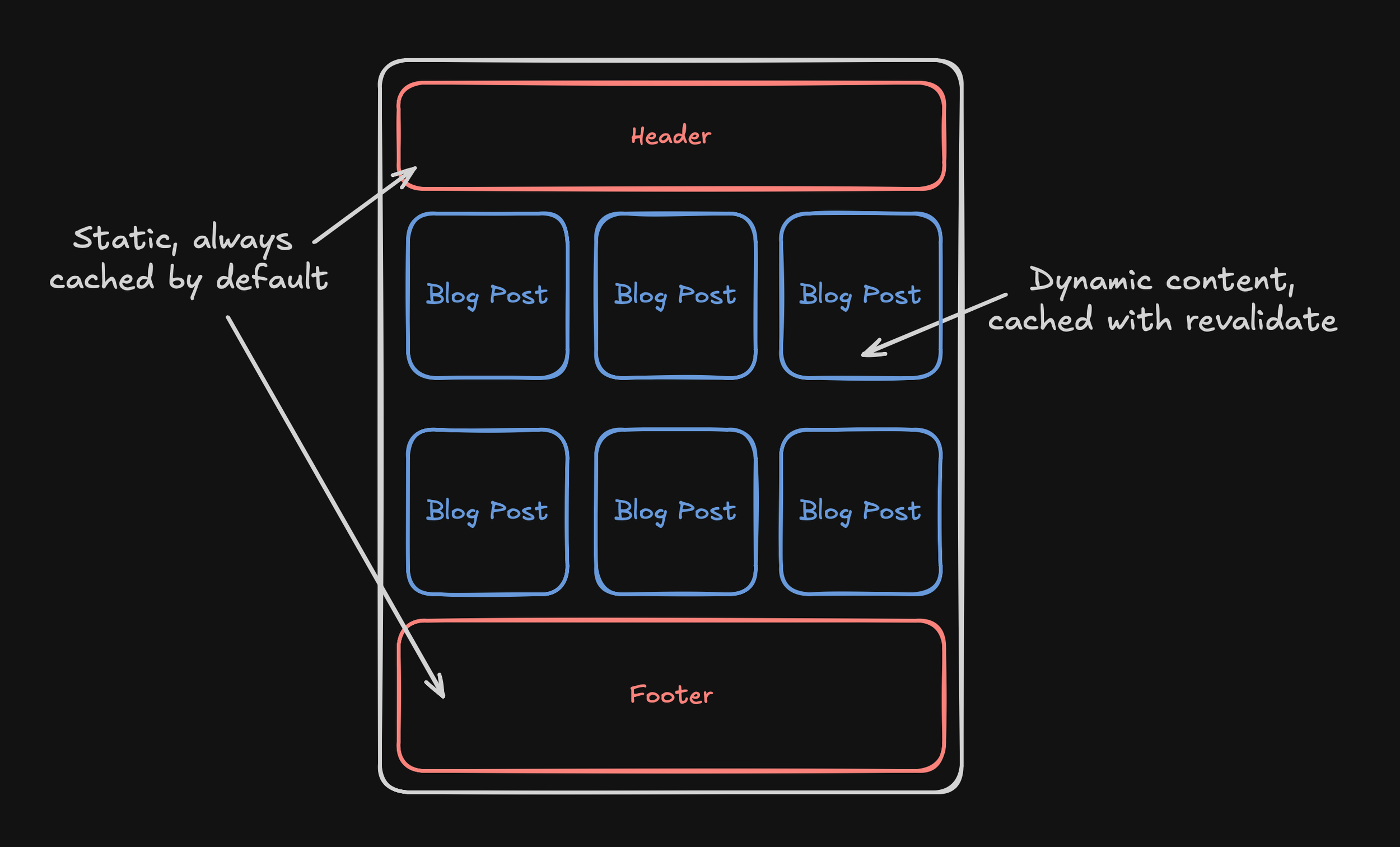
CDN / Edge Caching
When looking at these types of “shared but revalidated” scenarios, because the route and data are declared cacheable and the data is shared across users, Next.js and the hosting platform cache the output at the edge automatically.
In general (but not always!), if you are using a popular CMS with Next.js, no extra configuration is required and things will be cached at the edge as standard.
However…
Route Output Caching (Incremental Static Revalidation)
If you have things like blogs, they will of course be regularly updated in the CMS. Then the rendered page is cached automatically, and you control the way it is revalidated.
If you aren’t familiar with revalidation, it is the process of telling Next.js when to regenerate cached content so users and search engines see fresh data without fully disabling caching.
Basically you say “once you’ve cached this, wait a bit before refreshing it and re-caching it”.
Revalidation is triggered by the following:
Time-based revalidation of a component via a variable at the top of the page; in this example 3600 is the seconds (60 minutes):
-
export const revalidate = 3600 -
What actually happens with this is:
-
Everything is cached at build time
-
When the route is requested after 60 minutes, the first visitor sees the cached version
-
This triggers revalidation and the data is fetched fresh, and the 60 minute timer restarted
-
The process repeats
-
So if you are working with a site where posts get updated really often (say a fast moving news site) then you’d want to set the timer to more like 1 minute rather than 60.
In the case of Manual revalidation (often via a CMS hook) this occurs when posts are published in the CMS, and you are effectively saying “once you’ve finished publishing, revalidate everything to make it all fresh again”.
Developers will add things like:
-
revalidatePath('/posts/my-post') -
revalidateTag('posts')
These tell the Next.js build to refresh everything.
If your content team are publishing posts in the CMS that aren’t showing up, it’s probably because manual revalidation isn’t implemented properly.
Data Fetch Caching with Revalidation
If you’re an SEO this is definitely less important purely because it’s less common to cause issues.
In Next.js, fetch() calls in Server Components are cacheable by default, but their cache only persists if the surrounding route can be statically rendered or revalidated. So it’s a matter of using the same logic as above really; but generally fetch calls are going to be used client side.
When you use fetch() inside a server component, Next.js can cache the result of that fetch as part of its server rendering pipeline.
So when you’re working with server components, make sure to think about caching on each request.
There is a LOT more to that in terms of where and when you should be making fetch requests that are out of the scope of this article but can be found in my Vibe-coded Next.js: speed and crawlability article.
2. Dynamic Content that is User Specific Per Request
If content is user-specific, it’s a different story. This is purely because some of the data on a page is going to need to be dynamic each time it loads.
Imagine this applying to a route with components like the following:
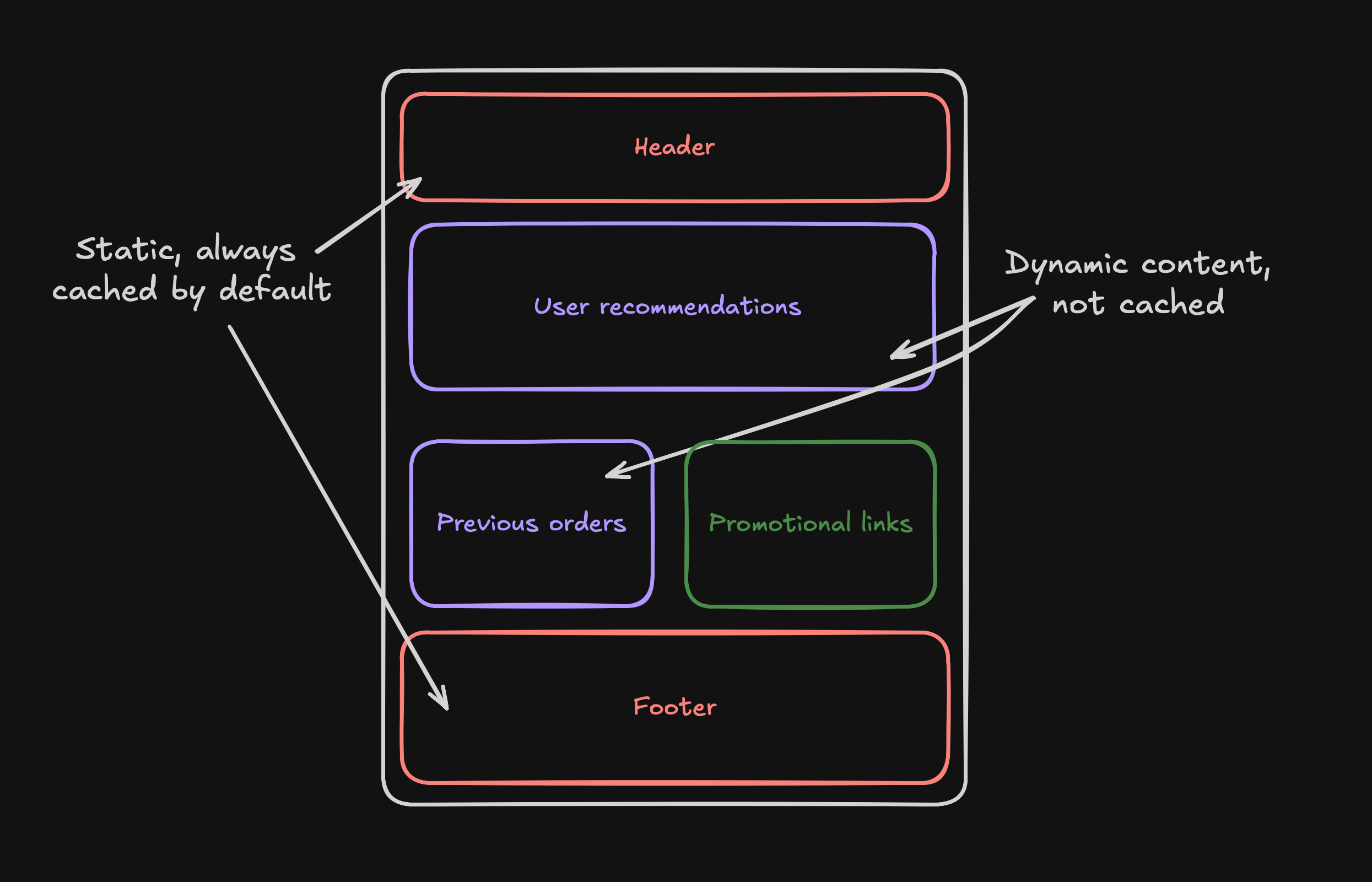
In this case, if you explicitly opt out of caching, Next.js renders fresh content per request. This is when a developer uses cache: ‘no-store’ on a fetch request.
There generally will need to be a good reason for this, as if it is on a route level, it will make the whole page dynamic and will lose the benefits mentioned in the previous section.
So at this point, it’s worth looking at how Next.js lets you mix static and dynamic content within the same page without sacrificing performance.
This is the biggest benefit of Next.js, the main source of confusion, and the main reason for accidental entirely client-side pages that can’t be crawled properly.
Dynamic Routes, Suspense, and Hydration
If an entire route becomes dynamic, there should be a clear reason for it.
In most cases, only a small part of a page actually needs request-time or user-specific data, not the whole thing.
This is where Suspense comes in.
Suspense allows Next.js to render and cache as much of a page as possible ahead of time, while deferring only the components that genuinely need to run at request time.
Instead of forcing the entire route to be dynamic, you create a boundary between static, shared content and personalised content.
Then your pages follow a pattern closer to this:
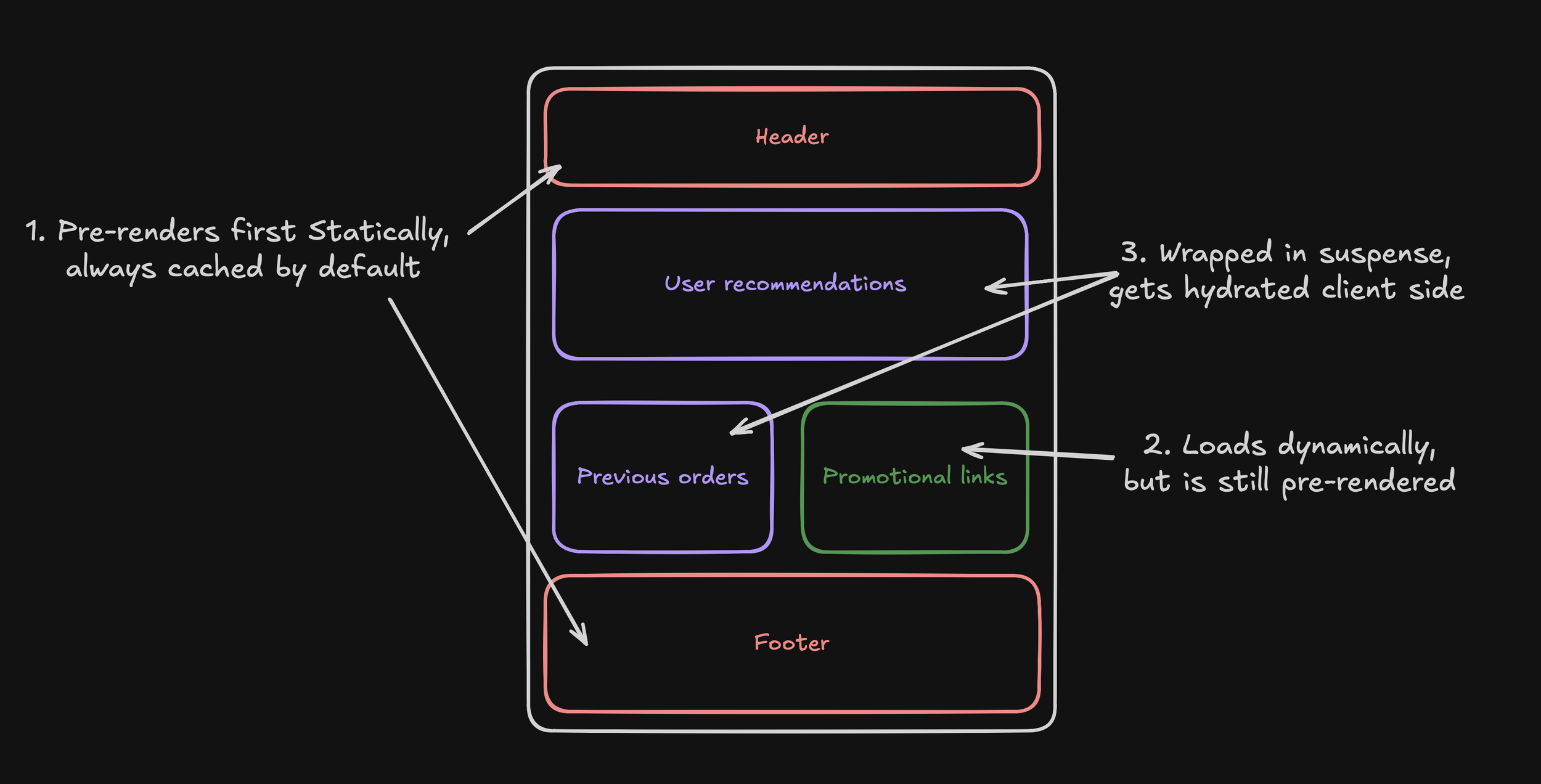
The header, footer, and promotional content can be pre-rendered and cached. Shared dynamic content can still be revalidated. Only truly user-specific elements, such as recent orders or account data are isolated behind a <Suspense> boundary and hydrated separately.
What matters most to Next.js is what must be known to generate the initial HTML. If user-specific logic is pushed behind Suspense, the route itself can remain static even though personalised content appears after load.
Again for technical SEOs and developers, it reduces the risk of entire pages becoming dynamic when only a small personalised component actually requires it. The same principle applies: make as many of your pages as possible generate statically.
If a route is fully dynamic, it should be because the whole page genuinely depends on request-time data. In most cases, that is not true, and Suspense is how you design around it.
What this means for SEOs and content teams
If you’re working on a modern stack with Next.js and a headless CMS like Payload or Sanity, caching decisions directly impact how quickly search engines and users see changes to content. Search engines don’t care how clever your caching is. They care about:
-
Whether a URL returns the correct content
-
Whether changes appear consistently and quickly
Content team workflows
For content teams, caching can cause basic frustration: “I published it but can’t see it”.
A well-designed Next.js setup solves this by:
-
Allowing editors to publish content with confidence
-
Automatically updating live pages
-
Keeping listings, navigation, and sitemaps in sync
From a team perspective, revalidation becomes part of the CMS, not a technical afterthought. Considerations from an SEO point of view also apply to content teams.
Key Considerations for SEOs
-
Next.js caching makes sites fast, but only explicit revalidation makes them accurate. Understand the revalidation strategy for the core routes like posts, informational pages, and product category pages.
-
Following this, you should be making sure that developers are aware of any issues that are causing content not to show, and work with them to understand how and when pages are revalidated after content changes.
-
Watch for stale content issues, especially metadata and canonicals. These can easily be an issue even for experienced developers.
-
If content updates don’t appear quickly, caching configuration should be your first suspect, not indexing.
I hope this post didn’t melt your brain. The most important point is that Next.js caching is not just a performance optimisation - it directly affects how reliably content is published, discovered, and updated.
If you understand when pages are static, when they are revalidated, and when they are truly dynamic, you are in a much stronger position to build fast sites that both users and search engines can trust.
If you need a hand auditing or refactoring your Next.js application, I’d love to help.